Create a clear listing
Add photos, a useful description, pricing, and rental details so renters understand what is available.

For item owners
Renti-Fi gives item owners a place to publish rental listings, respond to booking requests, communicate with renters, and keep rental activity organized.
Inside the app
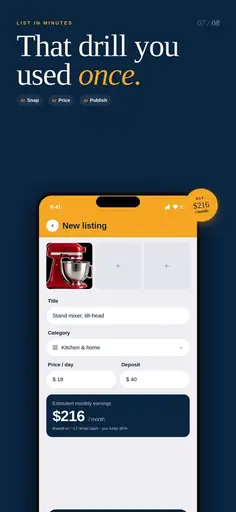
Create a listing from your phone by adding the item details, category, price, availability, and photos renters need to understand what you are offering.
Add photos, a useful description, pricing, and rental details so renters understand what is available.
Review incoming rental requests and decide whether the requested dates and details work for you.
Keep booking-related communication connected to the rental instead of relying only on separate messaging channels.
Booking and payment records help keep rental activity easier to follow.
Set a rental price that makes sense for the item, its value, and the length of the rental.
Start with items you are comfortable renting and improve your listings as you learn what renters need.
Download Renti-Fi to create a listing and start managing rental requests from the app.